Like most authors, I’d really like it if you bought my book. My debut novel, The Girls Will Be Okay, is a nerdy, interfaith queer young adult romance about a Lutheran girl coming to terms with her bisexuality and her crush on her lesbian Jewish best friend by writing fanfiction about their favorite detective show, and you can buy it here. I’d like it if you did buy it! I think it’s a good book that’s worth buying!
But I also know that inflation is high, money is tight, and many of us have neither the funds nor the shelf space to buy every book we’d like to read. That’s real. So if you want to read my book without buying it (and without pirating it, which is a disrespectful thing to do with books and can tangibly harm authors’ careers), or even if you’ve already bought my book but want to support it in other ways, here are some instructions for requesting a digital copy of my book from your library.
While it’s outside the scope of this post, you can also request that your library purchase a physical copy of my book. The self-publishing platform I use (IngramSpark) distributes books through the system that libraries use for acquisitions (Ingram), so it should be straightforward for the library to get either a physical or a digital copy or both. The reason I’m not giving instructions for that is because there’s a lot more variation in processes for requesting that your library buy a physical book, whereas most libraries use the same ebook app, which makes the process pretty much the same anywhere.
For this process, you’ll want to use a smartphone, and I’m including lots of screenshots to hopefully make the instructions super clear.
Part 1: Download the Libby App
Go to the App Store or Google Play Store (your phone will have one or the other).
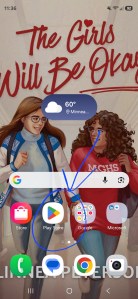
In the search bar, type “Libby.”
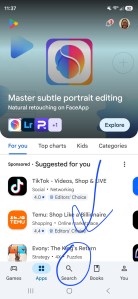
You should find an app called Libby, the Library App, made by Overdrive, Inc. Download the app. (I already have the app, so it says “Open” where it will say “Download” if you don’t have the app yet.)
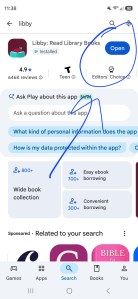
Part 2: Connect Your Card
The Libby app has five icons at the bottom of its display screen. Click the middle one.
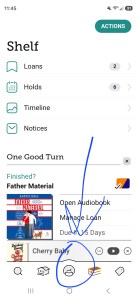
This should bring you to a page with an option that says Add Library (you may need to scroll down). Click on it.
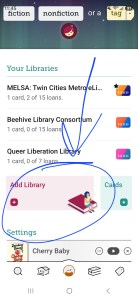
You can search for your library by using the map or searching by the library’s name, city, or zip code.
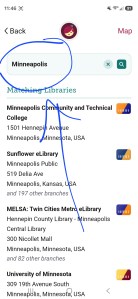
Once you have found your library, you will need to enter your library card information.
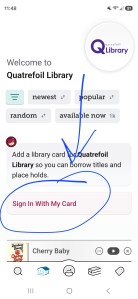
Part 3: Find The Girls Will Be Okay by Linnea Peterson
Go to the left-most icon at the bottom of the Libby screen. This will bring you to the search page.
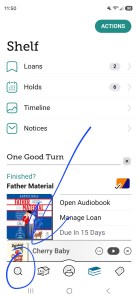
In the search bar, type “Linnea Peterson.” (Searching The Girls Will Be Okay brings up a bunch of other books with similar titles and may not bring up my book if your library doesn’t have it yet.) The first result should be the ebook of The Girls Will Be Okay.
Part 4: Request The Girls Will Be Okay by Linnea Peterson
Next to the title of the book, there should be a light gray rectangle with a yellow bell icon in the lower left corner of the rectangle. Click on it. (This looks a little different on my screen because I’ve already done it, but you should click on the place I circled.)
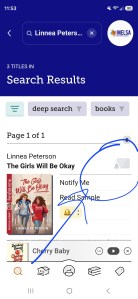
You will see a message that says, “This title is not in your library’s catalog. Tag it to receive a notification if the library acquires copies.” Below that message, there should be a bell icon again. Click the bell icon.
You have now requested the ebook, and you’ll be notified if your library buys it!
 Linnea Peterson